How to add links to TikTok bio in 2026: TikTok link in bio requirements explained!

 25 minutes
Scrolling through TikTok, it takes one good post to send thousands of people to a profile in a single day.
TikTok now has well over a billion monthly users, and studies show that a large share of them search for brands, products, and creators before making a decision. Without a clear link in your profile, all that attention fades as fast as it came.
That is why knowing how to add links to a TikTok bio is a real power move for social media managers, creators, and marketers. A single tap can send people to a store, a newsletter, an affiliate page, or a long‑form video that closes the sale.
In this guide, you will see what a TikTok bio link is, who gets it, how to work around follower limits, and how tools like Replug help you turn one link into many, hassle-free!
Let’s start with the basics and answer what a TikTok link in bio actually is!
What is a TikTok link in bio?
A “TikTok link in bio,” or simply a “TikTok bio link,” is a clickable URL that appears right under your profile photo, name, and short bio on your TikTok profile. It sends people straight from your profile to a website, online store, funnel page, portfolio, or any other destination you choose.
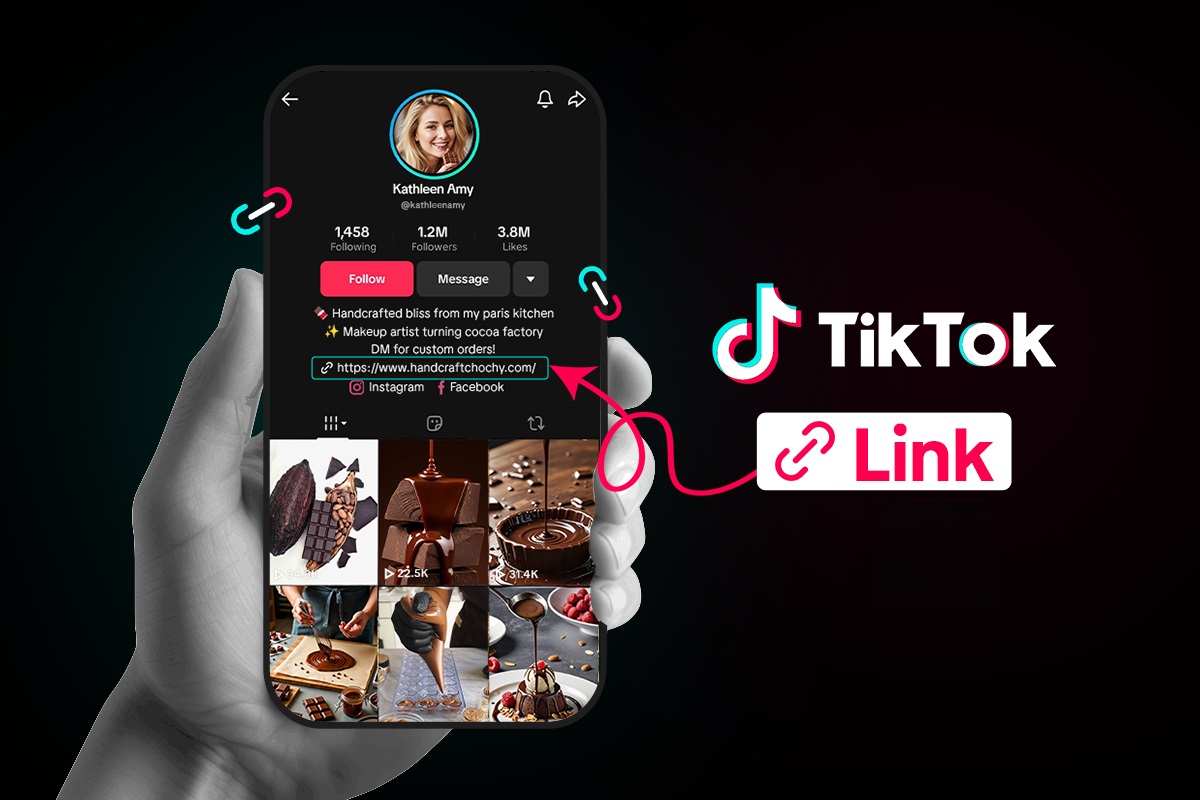
TikTok only gives you one clickable website field, so it is prime space for anyone who cares about traffic and sales.
For content creators, marketers, and brands, that website field works as a bio link page. Videos bring the views, but the link in bio turns that attention into page views, sign‑ups, and purchases.
When someone taps your profile after seeing a post, that bio link is the bridge from casual interest to real action.
Importance of a custom link in your TikTok bio
A custom link makes your profile look serious and safe to tap, because the URL matches your brand name instead of a long random string. That clear branding builds trust, which matters a lot when people decide whether to click from a short video to an outside site.
When people see the same domain on your TikTok bio link, website, and other social apps, they feel more confident that they are in the right place.
Besides, a custom link also:
- Gives you control over where traffic goes, even when your content focus changes over time. You can send everyone to a special landing page for a product launch, then later switch that same link to a newsletter or affiliate hub without touching the profile field again. That kind of control helps you test offers, track performance, and keep your promotion in sync across campaigns.
- Helps you improve your TikTok work, instead of guessing. When you use a managed link that connects to analytics, you can see how many clicks come from TikTok, which videos move people to your profile, and which pages convert best. Those numbers guide smart content choices, better calls to action, and a more focused professional bio that fits the audience you want.
- Offers you more room to grow across platforms. Many creators use a branded bio link that lists their store, podcast, YouTube, email list, and partnerships in one place. That means a single tap on TikTok can spread your audience across every channel that matters to your brand.
Can’t add link to TikTok bio: Eligibility criteria defined!
Many people open their TikTok profile, tap Edit, and notice there is no “website” field. This can feel confusing, but it usually comes down to TikTok rules about who can add a clickable link.
TikTok link in bio eligibility depends on your account type and follower count!
Here is a quick view of how it works by account type.
| Account type | Bio website field access | Follower requirement | Extra notes |
| Personal account | The website field appears after TikTok grants access in your region | Often 1,000 followers or more | Some regions still limit the website field for personal profiles |
| Business account | The website field appears once you switch to business | No follower minimum | Best option when you need a link but do not have 1,000 followers yet |
| Underage account | Often no website field, even with followers | Not available in many cases | TikTok protects younger users with tighter link rules |
| New account | The website field may be missing while the account is still fresh | Not clearly stated | You may need some activity and time before all profile features show up |
TikTok updates its rules from time to time, and rollouts can be different by region. The safest plan is to use a “Business account” if you need a clickable link as soon as possible.
How to open a business account on TikTok
A TikTok Business account gives you faster access to the website field, plus better analytics and other tools. The good news is that it is free and takes only a minute to set up.
Here’s how to set up a TikTok business account via the TikTok app:
1. Open the TikTok app and go to your Profile tab at the bottom right. Make sure you are logged into the account you want to switch.
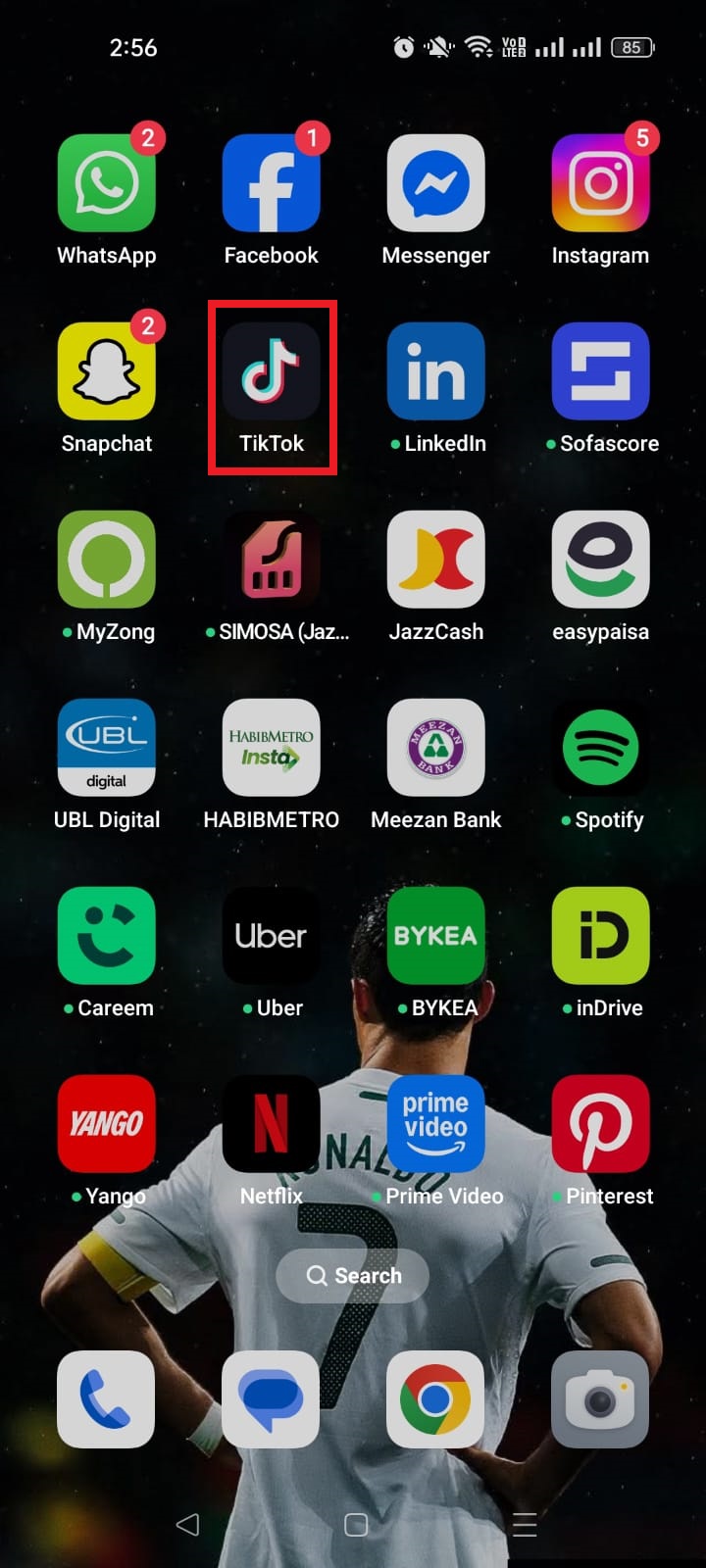

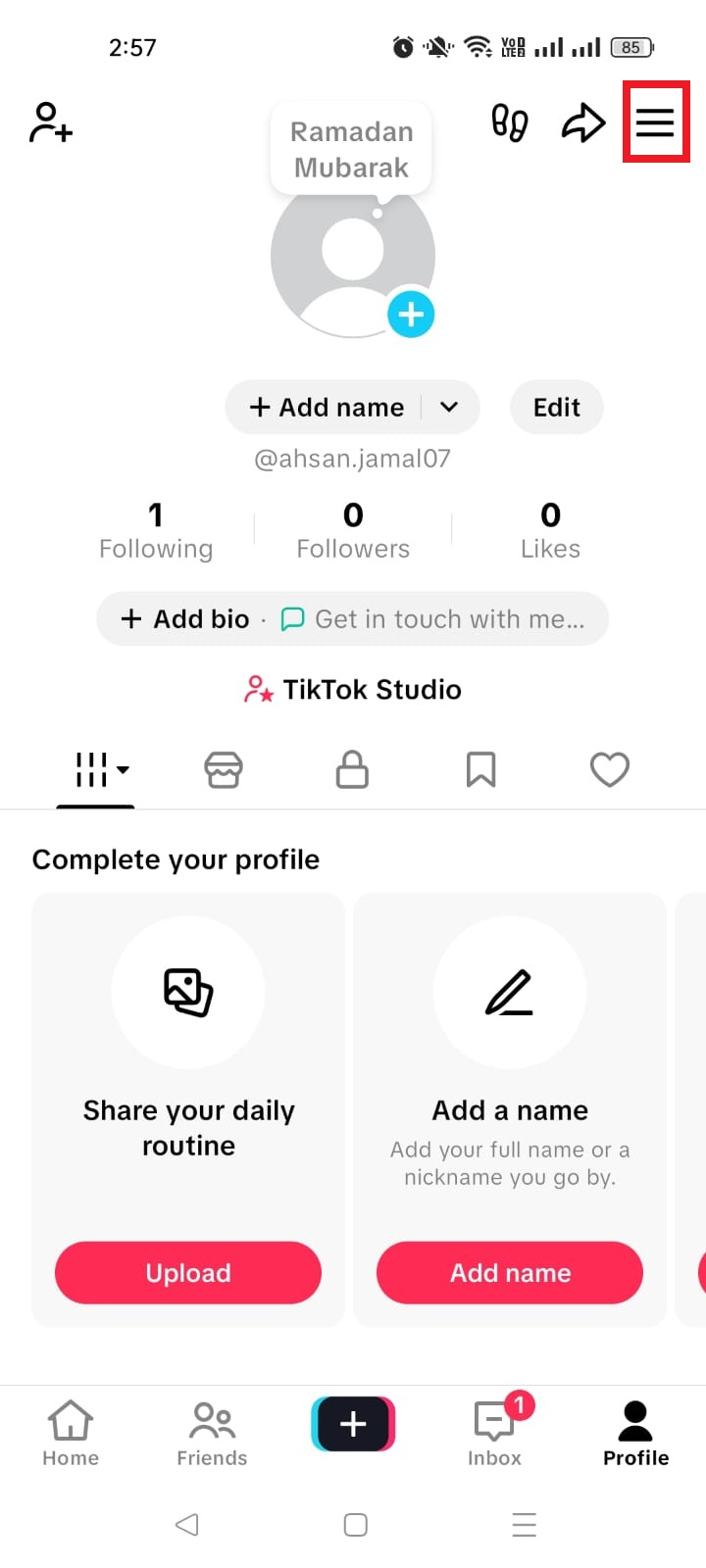
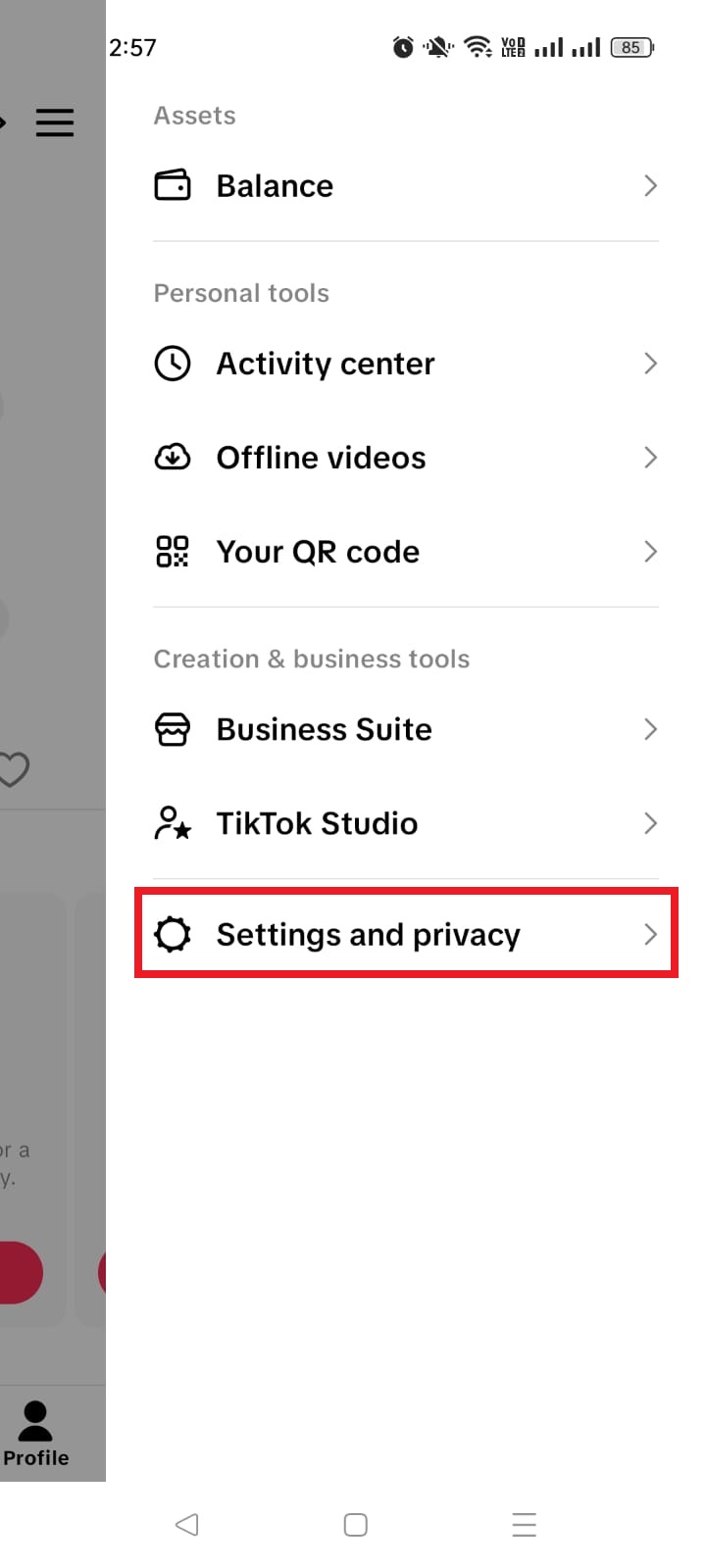
2. Tap the three‑line menu in the top right, then tap Settings and privacy. This opens the main control area for your account.
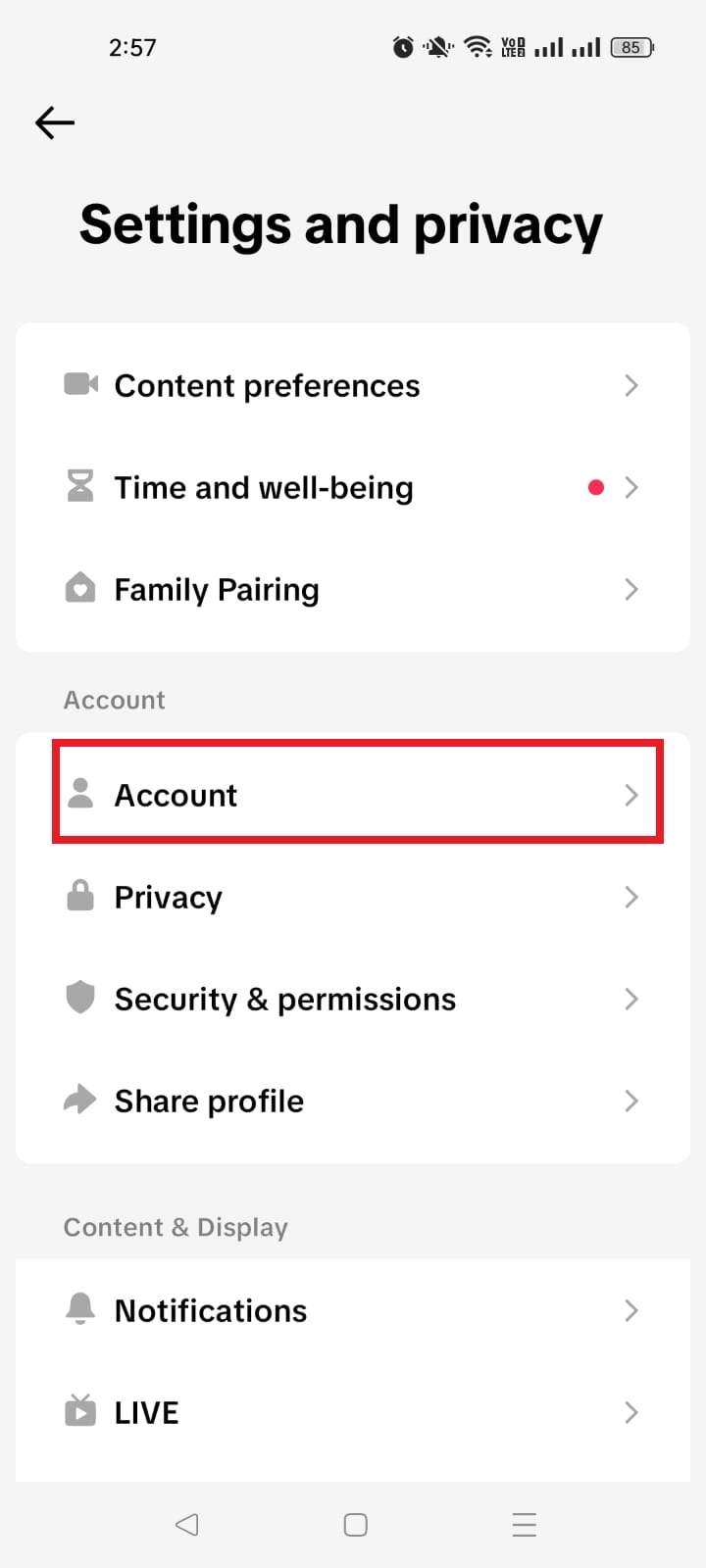
3. Tap Account. On most profiles, this sits near the top of the settings list and controls account type and region.
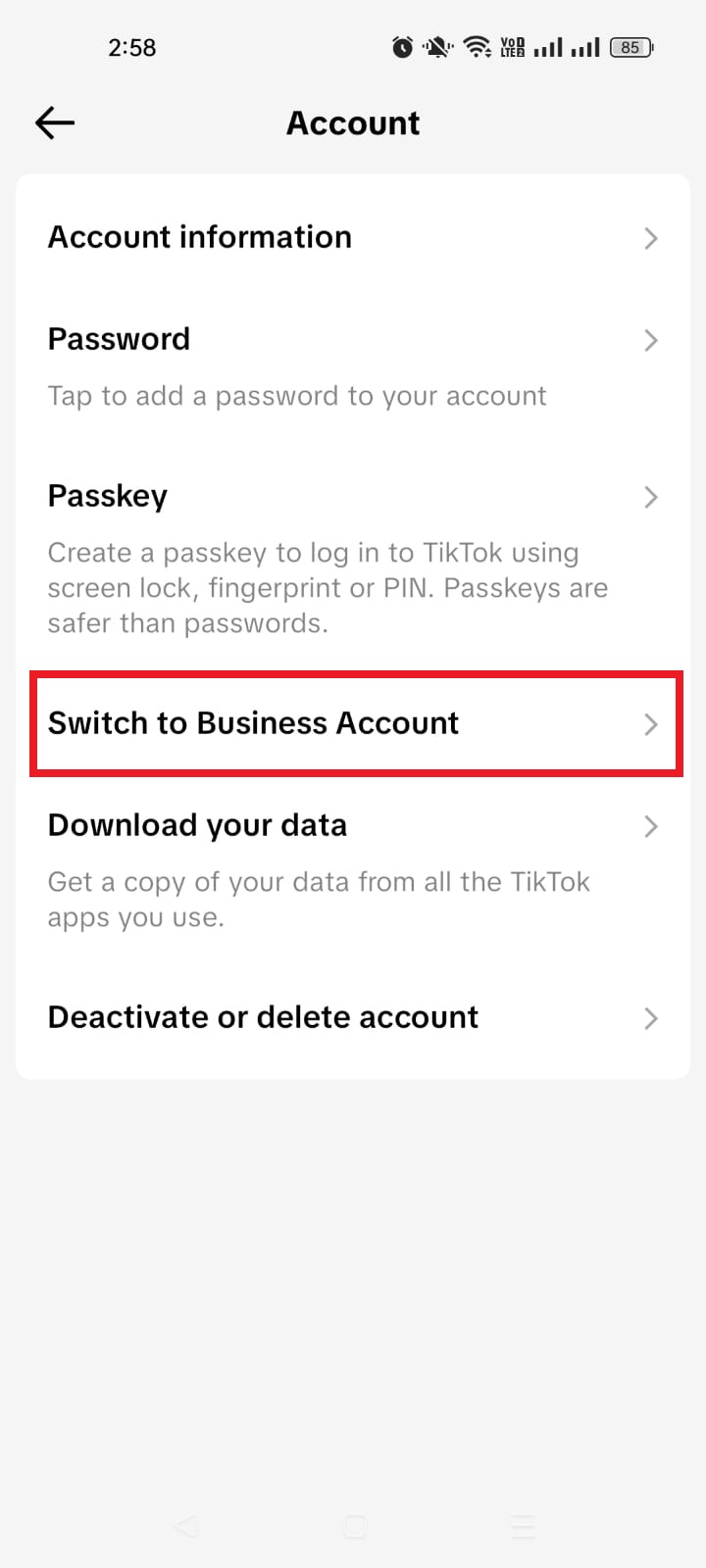
4. Tap Switch to Business Account. TikTok may show a short explanation of what a business profile can do before you confirm your choice.
5. Choose a category that best fits you, such as Education & Training, Software & Apps, or Others. This helps TikTok understand your content and may influence which features you see.
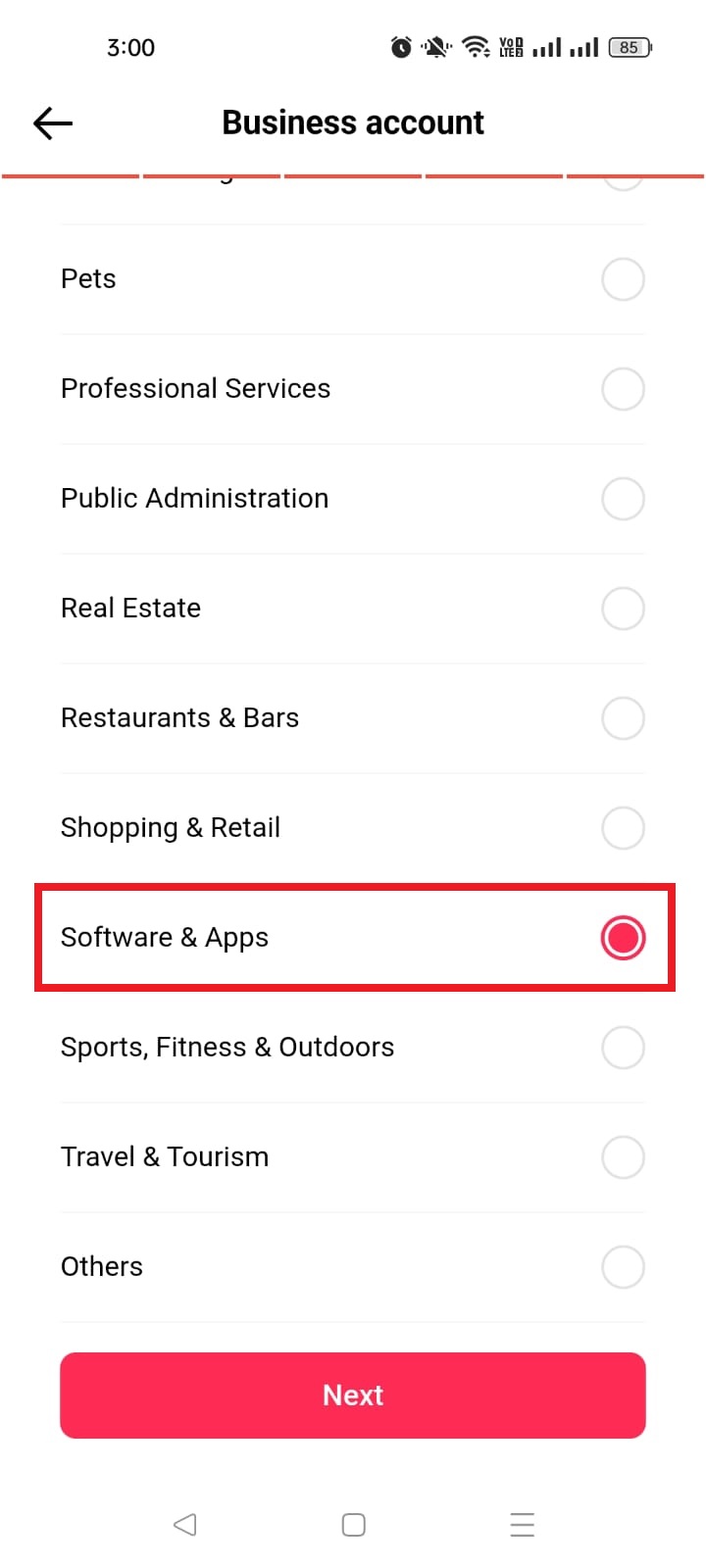
6. Add an email address and your bio (you can skip these if you want), and that’s all! You can always review those settings later if something looks off.
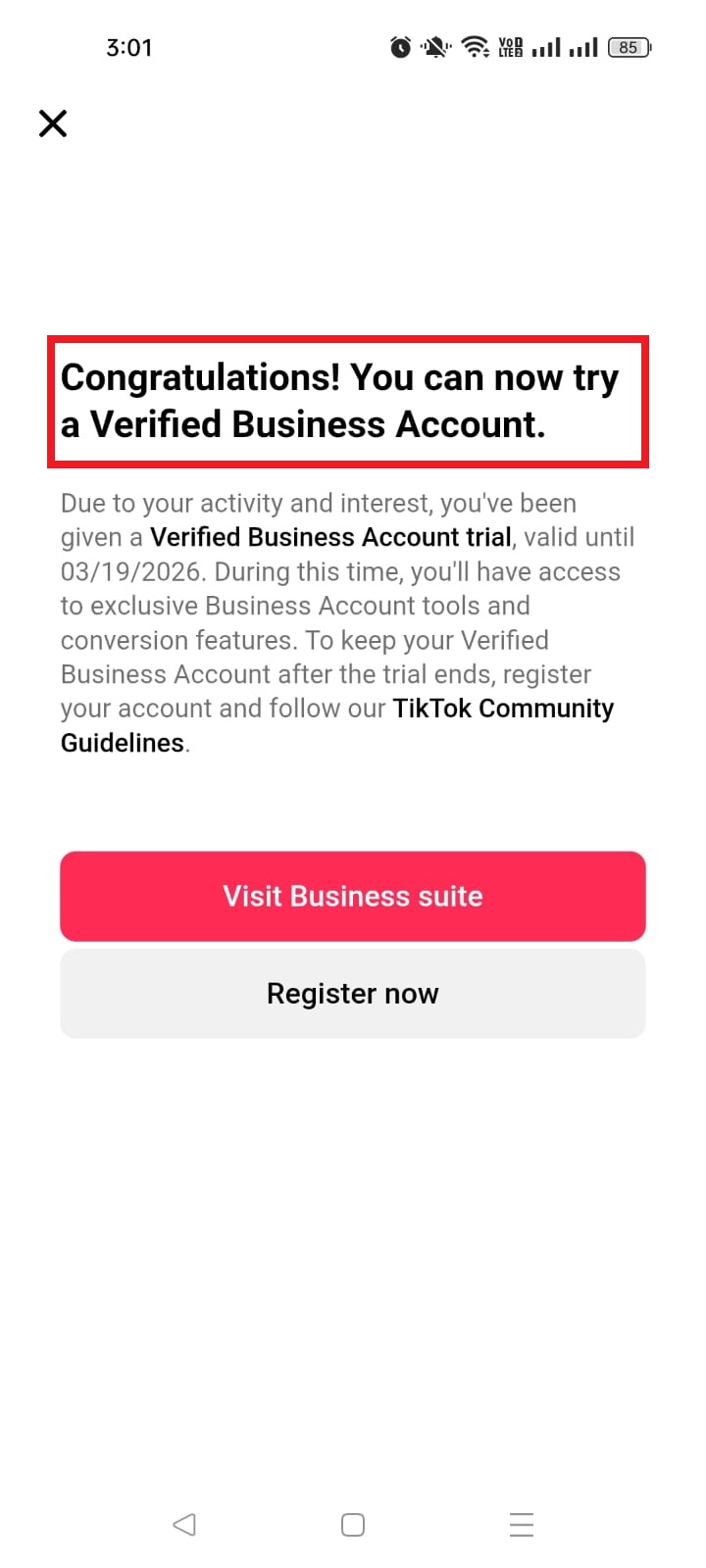
Here’s how to set up a TikTok business account from a desktop browser:
1. Open a browser on your computer, go to the TikTok website, and sign in.
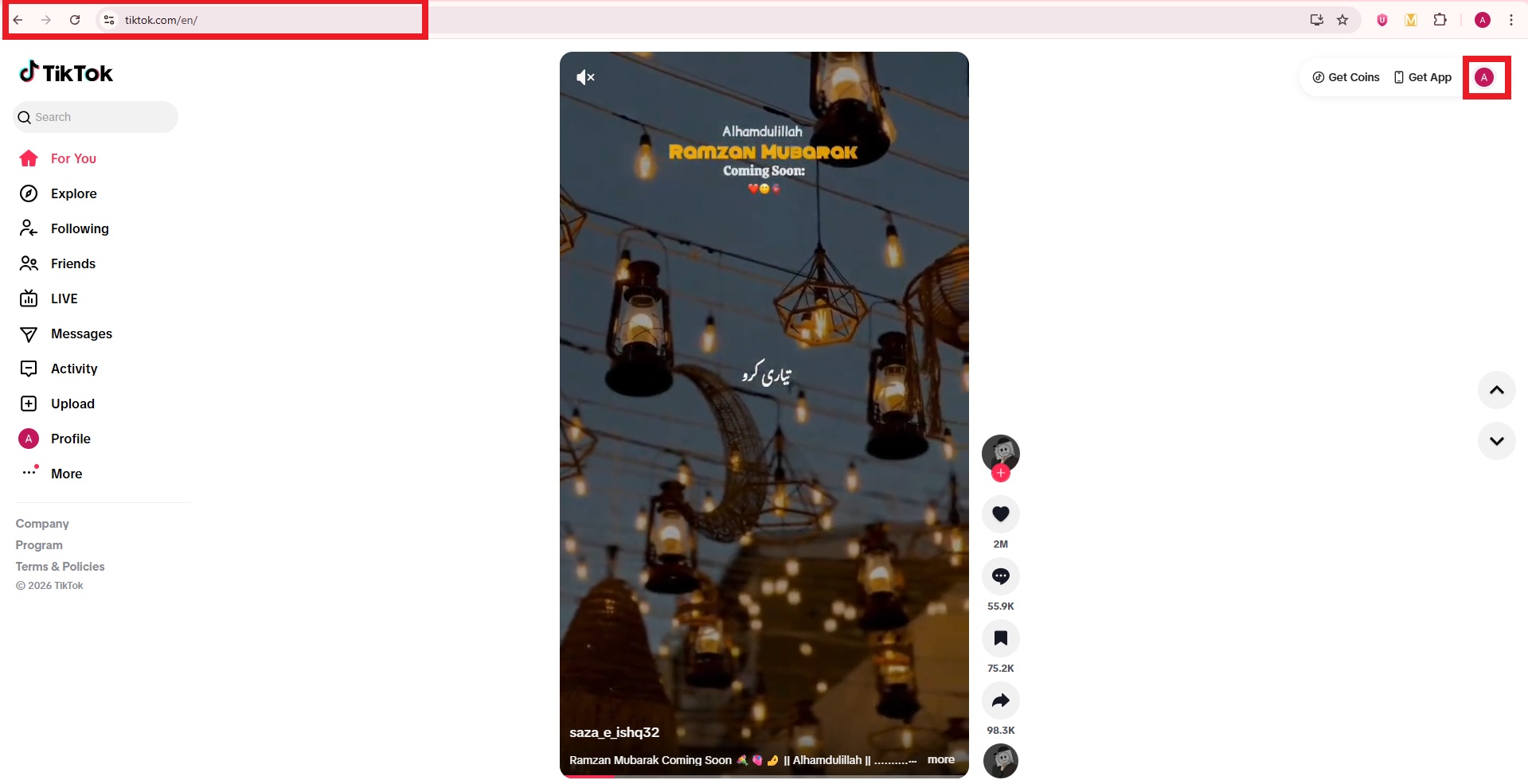
2. Move your mouse over your profile photo in the top-right corner and click View profile → Settings.
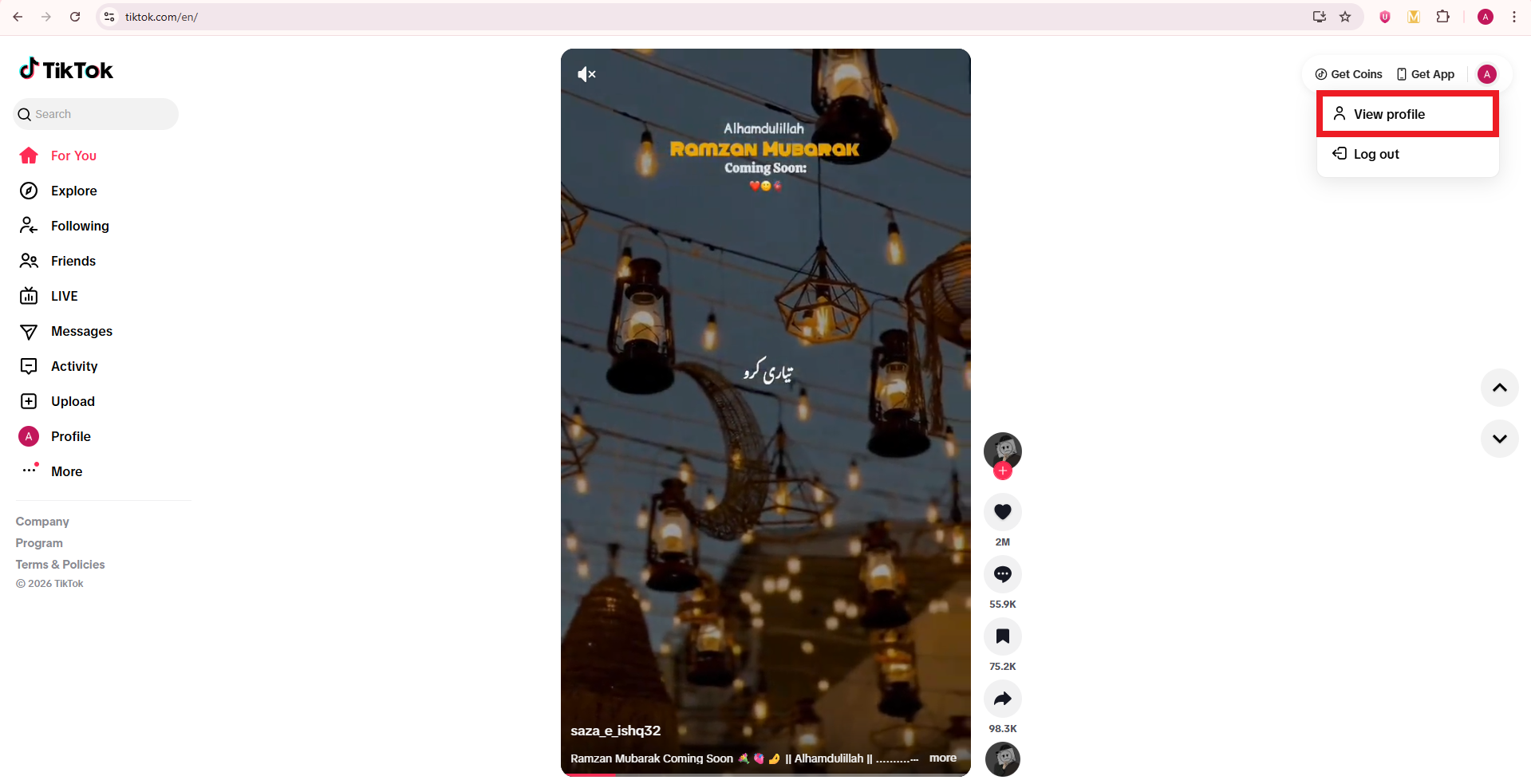
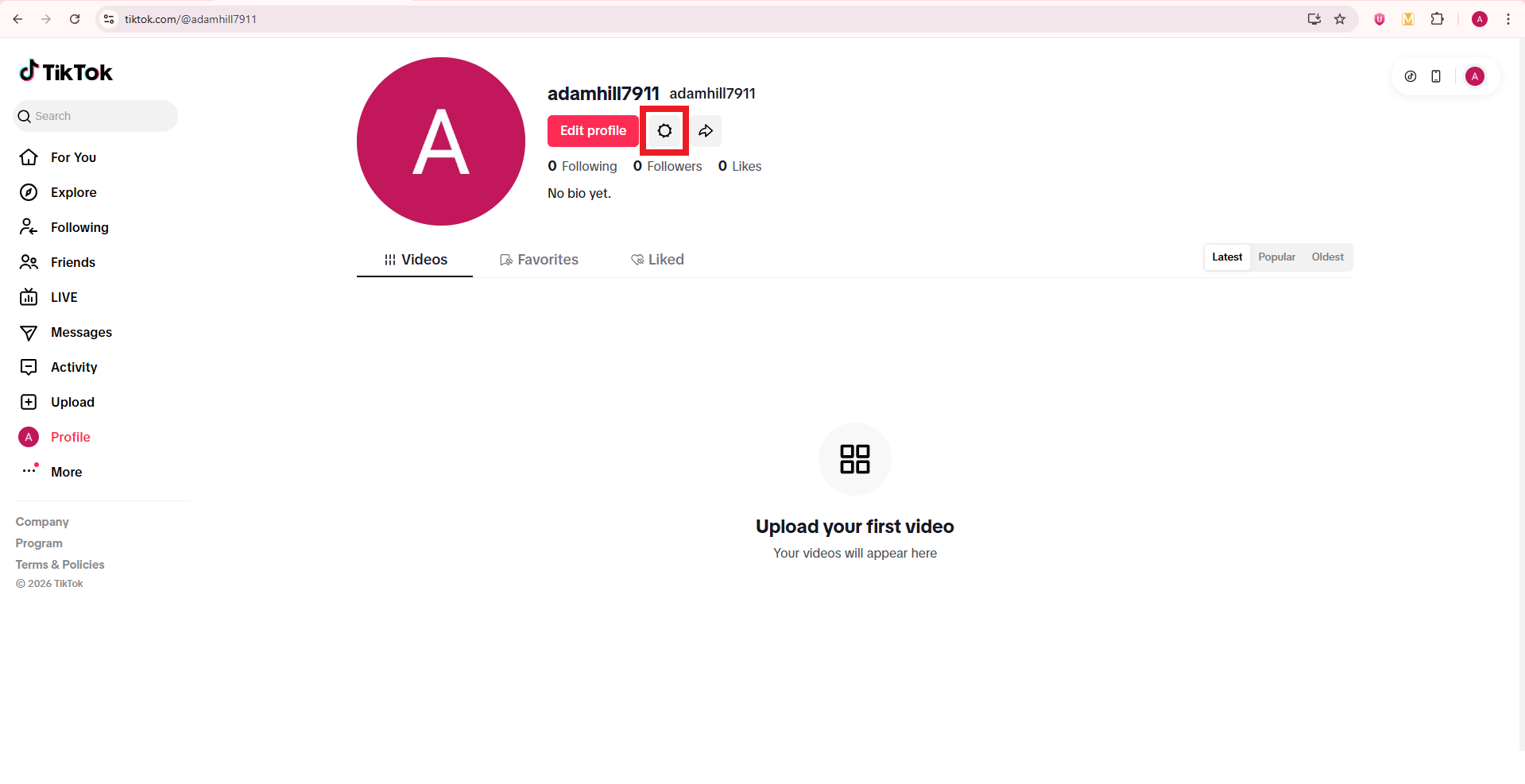
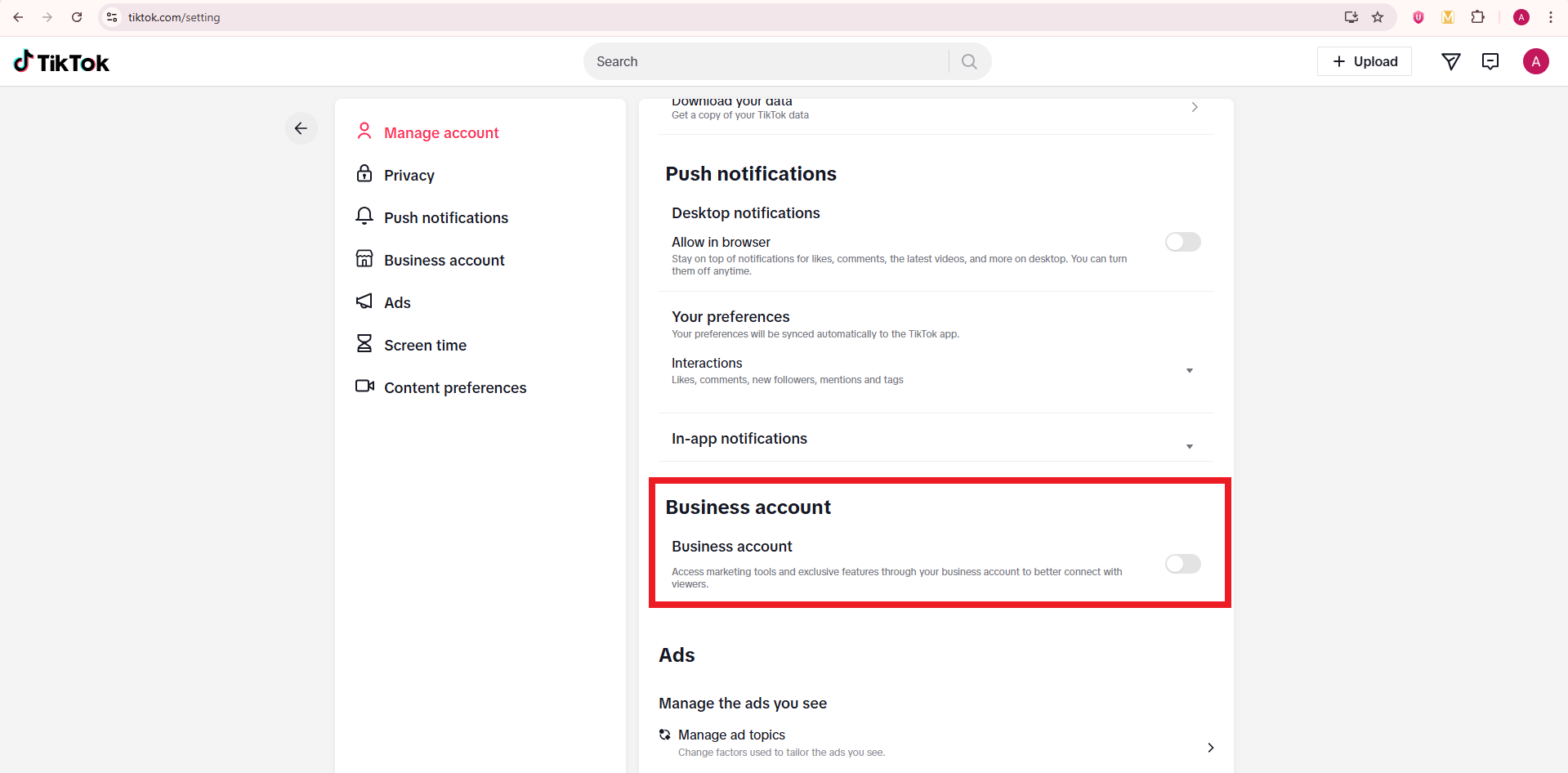
3. Look for the Business account section and turn on the toggle button.
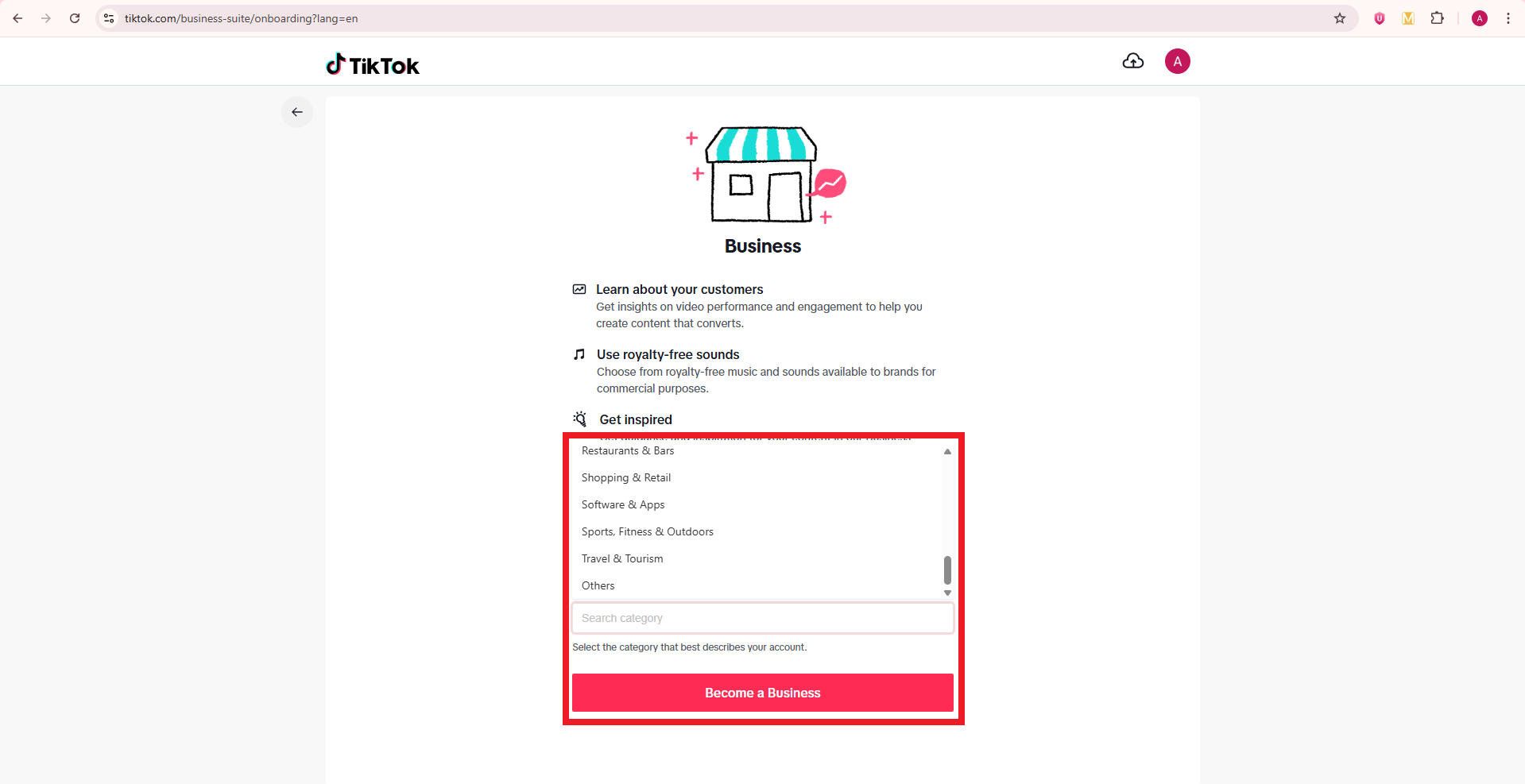
4. Pick your business category and click the button labeled Become a Business. TikTok may ask for more details, such as country or business name, especially if you plan to run ads later.
After this, go back to your profile and check the Edit profile screen. You should now have access to the website field that allows a clickable bio link.
Note: Alternatively, register directly at business.tiktok.com using a business email to create a new, separate business-specific account.
How to add links to TikTok bio on PC
Many managers like to work from a computer, so it is natural to ask how to add links to a TikTok bio on a PC.
TikTok still keeps most profile edits on mobile, but in some regions, you can add or edit the website field in a desktop browser. Even when that field is missing, you can still change your business status and social links from a computer.

Here’s how to add links to TikTok bio on laptop/PC:
1. Open the TikTok website in a browser and log in to the right account.
2. Click your profile photo in the top right, then click View profile.
3. Click Edit profile. On a desktop, this button usually appears near your avatar and username.
4. Look for a field named Website. If it appears, click it and paste your full URL, starting with https. If it does not appear, your account or region is limited on desktop, so you will need to use the mobile app instead.
5. Scroll through any other fields you want to adjust, such as your bio text or social media icons, then click Save.
6. Refresh your profile page and click the link to test it.
How to add links to your TikTok bio on phone
Most people will add a bio link from the TikTok app, because this is where TikTok gives full control over profile fields. Once your account meets the rules for a clickable link, the process is quick.

Here’s how to add links to TikTok bio on mobile in a clear, step‑by‑step way:
1. Open the TikTok app and go straight to your Profile tab. Make sure you are on the account where you want the link to appear, especially if you manage more than one.
2. Tap Edit button. You will see fields for your name, username, bio, and other info. For Business accounts, you should also see fields for Website and email.
3. Find the Website field. If you see only options for Instagram, YouTube, or other socials, your profile may not yet meet the website rules, or you may need to switch to a Business account, as shown earlier.
4. Tap the Website field and paste or type your URL. This can be your store home page, a newsletter sign‑up, a podcast, or any other main call to action. It is often smarter to send people to a single bio site rather than a random page.
5. Double‑check the URL. Confirm that there are no spaces, missing dots, or spelling errors, because even a small mistake will break the link. You can copy the link from your browser beforehand to avoid typos.
6. Tap Save in the top right. Then go back to your public profile and tap the link to test it. If it opens the right page, you are good to go. If not, repeat the steps and correct the URL.
A clean link in the right field makes it effortless for people to move from your videos to your site.
How to add link to TikTok bio without business account
Some creators prefer to stay on a personal account due to various reasons. In many regions, you can still add a website field on a personal profile once TikTok opens access for that account. The exact rules can depend on your country and TikTok’s current tests, but there are clear steps to follow.
Here’s how to put link in TikTok bio without business account:
1. Grow your follower base and keep your account active with steady posts, replies, and profile visits. TikTok often gives the website option to personal accounts that reach a follower milestone (1,000+ followers) and show healthy activity.
2. Keep your app updated. New versions of TikTok may change profile options, so check your app store for updates if you do not yet see the website field.
3. Open TikTok, go to your Profile tab, and tap Edit profile. On some personal profiles, a Website field appears once you reach a certain follower count (e.g., 1,000+ followers).
4. If you see the Website field, tap it and add your URL just like you would on a Business account, then tap Save. Test the link from your public profile to confirm that it works.
5. If you do not see the Website field, use a short, clear URL in your bio as a backup. People cannot tap it, but they can copy or type it. You can also push traffic to another platform, such as Instagram, where you keep a full link in your bio.
Staying on a personal profile gives you more freedom with sounds, but it may slow down access to clickable links depending on TikTok’s rules in your region.
How to add multiple links to TikTok bio
TikTok only gives you one clickable website field, which feels tight when you have offers, socials, and partner links to share. The smart way to handle this is to send that single link to a simple landing page that lists everything (all significant links) in a single, clean view. Tools such as Replug.io make this pretty easy and trackable.
Here is a simple process to turn one TikTok link into a full link hub:
1. Create a bio links page with Replug. This page serves as your mini-site and can display buttons for your store, newsletter, latest video, lead magnets, and affiliate links. You control the colors, layout, and branding so they match your profile and look like a professional bio extension.
2. Add key buttons to that page instead of clutter. Include links for:
- Your main revenue source (services or flagship product)
- One or two free resources
- Your top social channels
Try not to overload visitors with too many options, because clear choices tend to get more clicks.
3. Copy the bio page URL from your Replug dashboard. If you use a branded short domain with a short path, the link will look clean on TikTok and other apps. This also helps people remember it if they see it in a video overlay.
4. Open TikTok, go to Edit profile, and paste that bio page URL into the Website field. Tap Save, then test it from your public profile. Every visitor now lands on your link hub instead of a single destination.
5. Update the contents of your bio link page over time without changing the URL in TikTok. When you launch new campaigns or features, just swap buttons or move them higher on the page. The TikTok link stays the same, but the experience stays fresh.
This approach gives you “multiple links in one link” and makes your TikTok bio much more flexible as your content plan grows.
How to add link to TikTok bio without 1000 followers
That “1,000 followers” number scares many new creators, but there are ways to have a functional link strategy before you hit that mark. The key idea is to use the tools TikTok does offer and make good use of your other profiles.
Follow these steps if you have not reached 1,000 followers yet:
1. Switch to a Business account if your region allows it. As covered earlier, many Business profiles can add a website link without any follower minimum. This is the fastest and most direct path when you care about traffic and sales.
2. If a Business account still does not show a Website field, use the Instagram and YouTube social buttons in your TikTok profile. Add your full link hub or store link in the bio of those platforms, then point TikTok viewers there through your videos and captions.
3. Place a short, easy domain in your TikTok bio text as plain text. Viewers cannot tap it, but if the domain is simple, they can type it into a browser seamlessly. A branded domain with a short path, made with a reliable free link shortener, helps a lot here.
4. Keep working toward 1,000 followers with focused content, smart hooks, and strong storytelling. Once TikTok gives your profile full website access, you can move your main link from those workarounds into the Website field and reuse the same URL.
How to add link to TikTok bio with 1000 followers
If your personal account has at least 1,000 followers and TikTok supports website links in your region, the setup is simple. The hard work was growing the audience; now you just need to plug in the link and keep it sharp.
Use this quick guide once you reach that milestone:
1. Open the TikTok app and go to your Profile. Check the top of the screen to confirm your follower count is at or above 1,000. If it is close but not quite there, give the system a little time to update.
2. Tap Edit profile. TikTok often adds the Website field to personal accounts once they qualify under the TikTok link-in-bio eligibility rules for your region.
3. Look for the Website field and tap it. If it still does not show, try closing and reopening the app or updating TikTok from your app store.
4. Paste your main URL or a key landing page, then tap Save. Make sure the link starts with https, so it opens correctly.
5. Visit your public profile and tap the new link to check that it loads quickly and takes you to the right place. If you see any issues, fix the link and test again.
Read also: How to add your Discord link to TikTok bio (2 easy ways)
Key benefits of adding links to your TikTok bio
Adding a clickable link to your TikTok bio turns your profile from a simple page into a real traffic and revenue tool.
Instead of letting viewers stop at Like and Follow, you give them a clear next step that helps your business or brand. When used well, a bio link supports everything from affiliate offers to client work.

Here are some of the most important advantages:
- A bio link sends steady, targeted traffic to your website, shop, or email list. Each time a video hits the For You feed and pulls new views, some of those viewers click through to your profile. When your website field points to a focused page with a clear offer, a portion of that attention turns into leads or sales rather than random profile visits. Over time, this adds up to a large, reliable stream of visitors from TikTok.
- A good bio link shortens the gap between discovery and action. People see a quick video, tap your name, and land on a page that matches the promise in the content. That direct flow matters a lot for impulse buys, time‑limited campaigns, and product drops, because it removes extra steps that often kill conversions. This is where a well‑built professional bio and a tight landing page work together.
- A managed bio link gives you better data than TikTok alone. When you use a tool that tracks clicks, you see which topics, hooks, and posting times send the most visitors to your link. Then you can double down on what works, cut what does not, and plan content using real numbers rather than guesswork. This feedback loop is a big win for social media managers and paid media teams.
- A smart bio link setup protects you from sudden changes inside TikTok. If one feature gets limited or a trend cools down, your followers already know that the link in bio is the main hub for everything you do. You can adjust that hub any time without editing all your older posts, which makes your whole presence more stable.
Make the most of your TikTok bio link with Replug!
Once you know how to add links to your TikTok bio, the next question is what link to place there. This is where Replug helps a lot.
Replug is an all‑in‑one link management platform that gives you a branded bio link page, deep click tracking, and a custom URL shortener so your URLs stay clean and on‑brand.
With Replug, you can build a simple bio site that acts as your TikTok control center. On that page, you can:
- Add buttons for your store, email list, affiliate offers, and every other key asset
- Connect up to eight social profiles
- Embed video blocks
- Organize the layout with text and card blocks so visitors immediately see what matters most
This turns your one TikTok link into a smooth path through your whole online presence.


Replug also lets you shorten long URLs into branded links that fit TikTok’s tight character bio limit. You can add custom slugs, titles, and preview images, which make your links look sharp when people share them or see them on other platforms. Behind the scenes, Replug tracks every click, so you know exactly how much traffic your TikTok profile sends and which buttons people choose.
For advanced teams, Replug supports retargeting pixels and QR code generation. That means anyone who taps your TikTok bio link can later see tailored ads on other channels, and you can even send offline audiences to the same bio page through scannable codes. Put simply, Replug helps you turn that tiny TikTok bio space into a full traffic engine without adding extra work for your team.
Wrapping up
A strong TikTok presence is much more than just random views. It is about where people go after they like a post, and that is where your link in bio does the heavy lifting.
You have seen how to add links to TikTok bio on phone and PC, how to work around follower limits, and how to use bio link tools to share more than one destination at once.
When you connect that link to a focused bio page and track every click, TikTok becomes a real growth channel instead of just an awareness play.
Replug brings this all together with bio link pages, analytics, and extra helpers such as a free TikTok downloader and caption generator, so you can publish faster and measure better. Set up your link, test it, and let every new view work harder for your brand.
Frequently asked questions
Why can’t I put a link in my TikTok bio?
Most of the time, you cannot add a link because your account does not yet meet the TikTok link-in-bio eligibility rules. Personal accounts in many regions need at least 1,000 followers before the Website field appears, and some underage or very new accounts do not get it at all. Switching to a Business account often makes the website field available, so try that first if you need a clickable link quickly.
Do you need 1000 followers to add a link on TikTok?
You may need 1,000 followers on a personal account, but that is not the only path. Many Business accounts can add a website link with zero followers, as long as the feature is live in your region. If you want to skip the wait, switch to a Business account, then check the Edit profile screen on the TikTok app to see if the Website field appears.
How do I put a clickable link on TikTok?
To add a clickable link, open the TikTok app → go to your Profile → and tap Edit profile. If your account is eligible, you will see a Website field. Paste your URL there → tap Save, and then test the link from your public profile. If you do not see the Website field at all, you likely need either a Business account or more followers before TikTok enables this option.
How to link a website or social media account to your TikTok profile?
You can link a website in the Website field and social profiles in the Social section of TikTok’s Edit profile option.
– For Instagram or YouTube, tap Add next to the relevant option, sign into that platform, and approve the connection.
– For a website, paste your URL into the Website field and save.
Together, these features let your followers reach your main site plus other platforms in just a couple of taps.
Where is the TikTok bio located?
Your TikTok bio sits on your profile page, under your profile photo and username. You will see your short text bio first, then the clickable Website field if you have one, and then your linked social icons. When someone taps your profile name under a video, this is the section they see before scrolling down to your posted clips.
Why is my link in TikTok bio not clickable?
If your link appears as plain text, it is likely in the main bio text box rather than the Website field. Keep in mind, only the Website field creates a clickable link. Go to Edit profile, find the Website option, and enter your URL there. If the field is missing entirely, your account is not yet eligible for a clickable link, so you will need to meet the rules or switch to a Business account.
Can personal TikTok accounts have a link in bio?
Yes, many personal accounts can have a link in bio once they meet TikTok’s internal rules. In some regions, that means reaching 1,000 followers and maintaining a healthy account. Once TikTok flags your profile as eligible, a Website field appears in the Edit profile section on the app, and any link you place there becomes clickable on your public profile.
How to add links on TikTok bio and posts?
In your bio, add links using the Website field. Posts are different because regular video captions do not support clickable links. To send people to a link from a post, add a strong call to action like “Link in bio” in your caption and say it in the video. Some ad formats and shopping tools allow extra buttons, but for normal posts, the main link lives in your profile bio.
How to add link to TikTok story or video?
To add a clickable link to a TikTok story, create your story → tap the Sticker icon → select Link → and paste your URL. Standard TikTok videos do not allow most users to add clickable web links within the content itself. Instead, you mention your link verbally and in on‑screen text, then direct viewers to tap your profile and hit the link in bio. If you run paid ads or use TikTok Shop, you may see extra action buttons in the ad or product cards, but those features sit under TikTok’s ad and commerce tools, not regular posts.
Who can add a link to their TikTok bio?
Two main groups can add a link:
– Business accounts in regions where TikTok allows website fields for all businesses, regardless of follower count.
– Personal accounts that reach TikTok’s follower and activity thresholds, often around 1,000 followers.
TikTok may also limit links for younger users, so age and country can play a part, too.
How to add links to my TikTok bio via the TikTok app?
Open the TikTok app → go to your Profile tab → and tap Edit profile. If your account qualifies, you will see a Website field where you can paste your custom link. This can be a direct page or a Replug bio link that holds many links at once. Tap Save, then open your profile as a viewer and tap the link to confirm it loads the correct page on your phone.
How to add Instagram link to TikTok bio?
To link Instagram, open TikTok → go to Edit profile → and find the Social section. Tap Add Instagram, then sign into your Instagram account and approve the connection. After that, an Instagram icon shows on your TikTok profile. When people tap it, they go straight to your Instagram page, where you can place another bio link or more detailed profile information.
How to add Linktree to TikTok bio?
The steps are the same:
1. First, log in to your Linktree admin and copy your link from the Share menu.
2. Then, open TikTok, go to your Profile, and tap Edit profile.
3. Paste the copied URL into the Website field and hit Save.
Now, when someone taps the link on your profile, they land on your dedicated page.
How to add other links to TikTok bio?
No matter the site, the process is the same. Copy the full URL from your browser, open TikTok, go to Edit profile, and paste it into the Website field. As long as your account has access to that field, TikTok makes the link clickable on your profile. If you want to share multiple links, send people to a bio link page and place all other URLs there instead of swapping the TikTok link each time.
Provide a list of creative ideas for my TikTok link in bio?
You can send people to many kinds of pages through your TikTok link in bio. Popular ideas include:
– a “Start here” page that explains who you are
– a free mini course
– a PDF resource library
– a quiz that matches people with products
– a behind‑the‑scenes vlog playlist
How to write a standout TikTok bio in 2026?
A standout TikTok bio is focused on the viewer. Here are some tips for writing a winning TikTok bio:
– Use one line to say who you are and what you help people do, and one line to tell them what to tap next.
– Add one or two emojis that match your style, plus a strong call to action pointing to your link in bio.
When your wording, visuals, and link all support one main goal, your professional bio turns profile views into real results.